(2025 - Present)
B2B SaaS · Mobile + WebSimplifying B2B ordering in low-literacy retail environments
I redesigned a B2B field app used by retailers in an aftermarket distribution network — reducing cognitive friction so users could complete key tasks independently, without calling the sales rep.
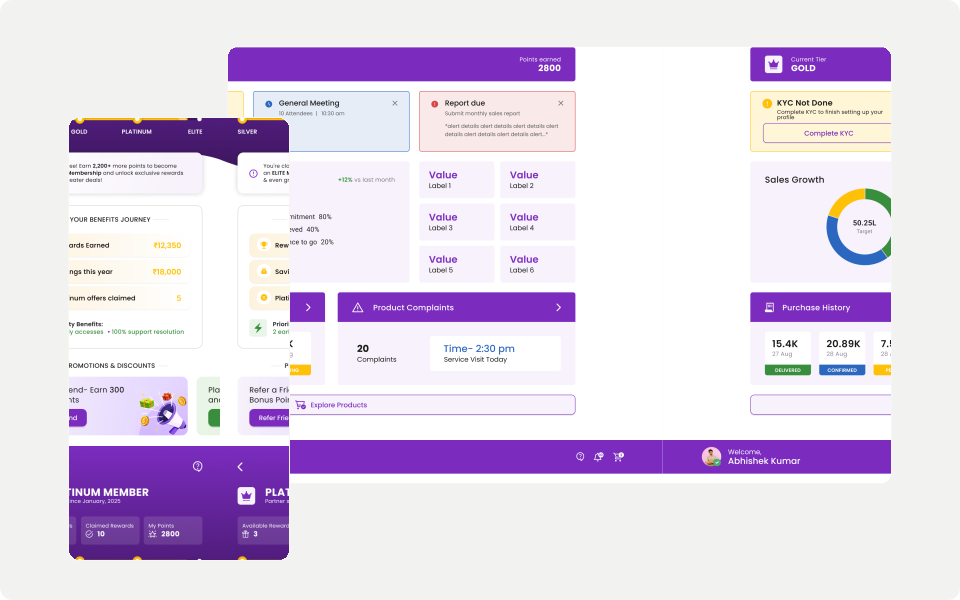
My focus: Progressive disclosure, recognition over recall, and designing for trust — in environments where one wrong tap means a missed order.
Timeline
(2025 - Present)
Role
Sole UI/UX Designer
Team
1x CEO
1x CTO
2x Senior Developer
One-minute project overview
Problem
Retailers within a B2B aftermarket network had access to a digital app for ordering and tracking — but continued to rely on phone calls and sales representatives instead. The app was feature-rich but not aligned with how users actually worked.
Challenge
Designing for users with low digital literacy, working in fast-paced on-ground environments, while integrating with complex backend systems — without oversimplifying what the product needed to do.
My approach
Progressive disclosure and task prioritisation — surfacing what users needed most, sequencing complex flows into steps, and designing for recognition rather than recall.
Outcome
Retailers completed browse-to-order end-to-end within the app — reducing reliance on sales reps and completing KYC onboarding without mid-flow drop-off.
Overview & Research
Overview
The Retailer App is a B2B mobile and web product used by retailers and on-ground influencers within an aftermarket distribution network — enabling ordering, tracking, and loyalty management across the field.
Despite being feature-rich, real-world usage revealed the app was not making retailers' work easier — it was adding to it.
15—20
Users validated in field
3—4
Retail locations visited
1
Sole designer on the project
What I found in the field
Browsing ≠ Ordering
Retailers used the app to browse products but still placed orders over phone calls — making the app feel redundant rather than helpful.
Hidden actions
Order tracking, complaint status, and loyalty visibility were buried. Dense screens caused hesitation and mid-flow abandonment.
Trust gap
Users relied on memory or sales reps instead of the app — a clear signal the system hadn't earned their confidence.
"Why do I have to browse products in the app if I still have to place the order over a call?"
— Retailer, field visit, Bangalore
Constraints
Why this was so hard
This was not a visual redesign problem. Several constraints made the challenge inherently complex.

Low digital literacy
Most retailers were comfortable with basic smartphone use but struggled with dense screens, unfamiliar terminology, and multi-step workflows.

On-field usage
The app was used in busy retail environments alongside customer interactions and phone calls — leaving little room for exploration or error.

System complexity
The app needed to integrate with SFA and DMS systems imposing rigid operational rules, while supporting ordering, schemes, loyalty, analytics, and complaints simultaneously.

Multiple user roles
The Retailer and Mechanic App shared the same UI framework with role-based access differences — requiring consistency without oversimplifying role-specific needs.
Design Decisions
How I decided what to build — and why.
Every decision was made against one question: does this make the retailer's work easier, or harder? Here are the three that shaped the design most.
01. Decision
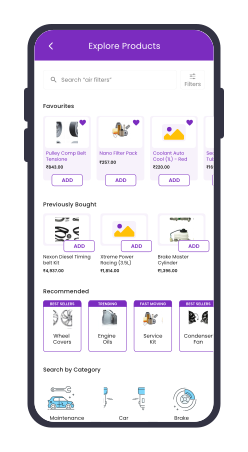
Surfaced high-frequency actions on the home screen
Why
Retailers had seconds to find what they needed between customer interactions. Browse, order, and track had to be immediately visible — not buried in navigation.
Observed during field validation — retailers completed browse-to-order without calling the sales rep
02. Decision
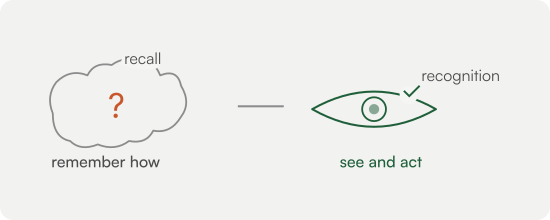
Designed for recognition over recall
Why
Users with low digital literacy shouldn't have to remember how the system works. Familiar labels, smart defaults, and contextual guidance reduced mental effort.
Users navigated the redesigned flow independently — without prompting from the sales rep.
03. Decision
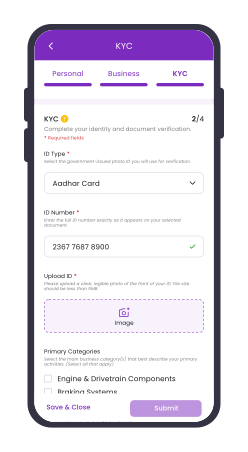
Broke complex processes into sequential steps
Why
KYC onboarding and order booking had multiple stages that overwhelmed users when shown all at once. Step-by-step design reduced drop-off at critical flows.
Observed during pilot testing — retailers who previously abandoned KYC mid-flow completed onboarding end-to-end
Outcome & Reflection
What changed — and what it taught me.
Three decisions. One question: does this make the retailer's work easier, or harder?

Reduced phone dependency
Retailers completed browse-to-order end-to-end within the app — with less reliance on sales representatives and phone calls.
Improved task confidence
Users navigated key flows independently during field validation — including order tracking and loyalty visibility.
Cleaner onboarding
Step-by-step KYC flows reduced mid-flow drop-offs during pilot testing.
Reflection
This project reinforced that good UX is not about adding features — it is about aligning systems with how people actually work. Designing for users with low digital literacy in on-ground environments pushed me to question every layer of complexity. The questions it raised — about cognition, trust, and the gap between how systems are built and how people actually use them — are what drive my interest in formally studying Human-Computer Interaction.